Today, a co-worker wanted to try creating a web reference instead of a service reference in Visual Studio. The result of his little experiment was interesting... we had a Guid typed parameter that we were passing to a function. The proxy class generated by adding the service reference maintained the Guid type, while the proxy class generated by adding the web reference had a string type instead.
Also, in my previous post I mentioned that the service references (which uses "svcutil.exe" to generate the proxy classes) can only be used by .NET 3.5 clients, so older clients can only use web references (which uses "wsdl.exe" to generate the proxy classes).
Showing posts with label dot-net. Show all posts
Showing posts with label dot-net. Show all posts
Sunday, February 8, 2009

Monday, February 2, 2009
Linq-to-Entities doesn't support Collection.Contains
My Linq-to-Entity woes just won't come to an end. I tried doing a query like:
var rset = (from iterRow in db.TableA
where myArray.Contains(iterRow.Id)
select iterRow);
...but I just get the exception along the lines of:
LINQ to Entities does not recognize the method 'Boolean Contains(Int32)'
method, and this method cannot be translated into a store expression.
As the Linq to Entities framework (from .NET 3.5 SP1) still doesn't support the Contains method, that just one more thing that makes me wonder why the stars didn't reveal that Linq to SQL would be a better choice for my project.
There's a solution suggested here (scroll down to the post by Hongye Sun from Microsoft - no pun intended) that I didn't try out yet, but there is another post here saying the solution was successful.
var rset = (from iterRow in db.TableA
where myArray.Contains(iterRow.Id)
select iterRow);
...but I just get the exception along the lines of:
LINQ to Entities does not recognize the method 'Boolean Contains(Int32)'
method, and this method cannot be translated into a store expression.
As the Linq to Entities framework (from .NET 3.5 SP1) still doesn't support the Contains method, that just one more thing that makes me wonder why the stars didn't reveal that Linq to SQL would be a better choice for my project.
There's a solution suggested here (scroll down to the post by Hongye Sun from Microsoft - no pun intended) that I didn't try out yet, but there is another post here saying the solution was successful.
LINQ to Entity Joins
Joins with LINQ-to-Entity are pretty straightforward - you don't have to write join conditions manually!
However, sometimes you do get an error that looks a little like this:
An expression of type PkTableEntity is not allowed in a subsequent from clause in a query expression with source type System.Data.Objects.ObjectQuery<FkTableEntity>. Type inference failed in the call to SelectMany.
It simply means that you've put your tables in the wrong order. I did something like this:
var rset = (from iterFkEntity in objDbEntities.FkTableEntity
from iterPkEntity in iterFkEntity.PkTableEntities
where iterPkEntity.ColumnA == 3
select iterFkEntity);
To correct it, I simply had to flip over the PkTable and the FkTable and turn it into:
var rset = (from iterPkEntity in objDbEntities.PkTableEntity
from iterFkEntity in iterPkEntity.FkTableEntities
where iterPkEntity.ColumnA == 3
select iterFkEntity);
Re-compile and the error is gone!
However, sometimes you do get an error that looks a little like this:
An expression of type PkTableEntity is not allowed in a subsequent from clause in a query expression with source type System.Data.Objects.ObjectQuery<FkTableEntity>. Type inference failed in the call to SelectMany.
It simply means that you've put your tables in the wrong order. I did something like this:
var rset = (from iterFkEntity in objDbEntities.FkTableEntity
from iterPkEntity in iterFkEntity.PkTableEntities
where iterPkEntity.ColumnA == 3
select iterFkEntity);
To correct it, I simply had to flip over the PkTable and the FkTable and turn it into:
var rset = (from iterPkEntity in objDbEntities.PkTableEntity
from iterFkEntity in iterPkEntity.FkTableEntities
where iterPkEntity.ColumnA == 3
select iterFkEntity);
Re-compile and the error is gone!
Thursday, January 29, 2009
More Linq2Entities From The Real World
I've built a WCF service that takes as a parameter an entity object with a reference to another entity (a foreign key-primary key relationship). When I try adding it to the database (context object) with LINQ, I get the following exception:
The object cannot be added to the ObjectStateManager because it already has an EntityKey. Use ObjectContext.Attach to attach an object that has an existing key.
I tried manually attaching the entity reference, but that didn't seem to work either so I finally had to get the primary key value of the reference, re-fetch the object from the database and set the reference again with the newly-retrieved object.
They make this so much harder than it should be :-(
The object cannot be added to the ObjectStateManager because it already has an EntityKey. Use ObjectContext.Attach to attach an object that has an existing key.
I tried manually attaching the entity reference, but that didn't seem to work either so I finally had to get the primary key value of the reference, re-fetch the object from the database and set the reference again with the newly-retrieved object.
They make this so much harder than it should be :-(
Wednesday, January 28, 2009
WCF in the Real World - a case of two definitions for a class
I've been using 2 WCF web services on my project - Service1.svc returns an entity object which I have to pass to Service2.svc. Now, after I add a service reference to both in Visual Studio, I get 2 classes - Service1.Entity and Service2.Entity and I can't cast one to the other.
The solution is to either take the properties of one class and put it into another within the client-side code, or put the class into a class library used at both the server and the client side. At the client side, you simply have to add a reference to the DLL before you add the service reference to prevent svcutil from creating the class in a new namespace.
UPDATE: You can find more about it here and here.
The solution is to either take the properties of one class and put it into another within the client-side code, or put the class into a class library used at both the server and the client side. At the client side, you simply have to add a reference to the DLL before you add the service reference to prevent svcutil from creating the class in a new namespace.
UPDATE: You can find more about it here and here.
Monday, January 19, 2009
iText: A PDF library for Java/.NET
I've been trying the iText library lately. It makes generating PDFs quite simple. Check out this C# code snippet of inserting an image (JPEG, in this case) into a PDF:
Document doc = new Document();
PdfWriter pdf = PdfWriter.GetInstance(doc, new System.IO.FileStream("fileout.pdf", System.IO.FileMode.Create));
doc.Open();
doc.NewPage();
#region Getting my byte array
//You don't have to do this if you are using a database - read the image as a byte array from the database instead
FileStream fstream = new FileStream(@"C:\rosewhite.jpg", System.IO.FileMode.Open);
byte[] byteBuf = new byte[100000];
int actualSize = fstream.Read(byteBuf, 0, 100000);
byte[] byteBufNew = new Byte[byteBuf.Length];
for (int i = 0; i < byteBuf.Length; i++)
{
byteBufNew[i] = byteBuf[i];
}
#endregion
//provide the byte array you got from the database in place of byteBufNew
doc.Add(new Jpeg(byteBufNew));
doc.Close();
You can do lots of other stuff with iText too, such as inserting tables, add digital signatures, bookmarks etc. iText is a free library and can read more about it here.
Document doc = new Document();
PdfWriter pdf = PdfWriter.GetInstance(doc, new System.IO.FileStream("fileout.pdf", System.IO.FileMode.Create));
doc.Open();
doc.NewPage();
#region Getting my byte array
//You don't have to do this if you are using a database - read the image as a byte array from the database instead
FileStream fstream = new FileStream(@"C:\rosewhite.jpg", System.IO.FileMode.Open);
byte[] byteBuf = new byte[100000];
int actualSize = fstream.Read(byteBuf, 0, 100000);
byte[] byteBufNew = new Byte[byteBuf.Length];
for (int i = 0; i < byteBuf.Length; i++)
{
byteBufNew[i] = byteBuf[i];
}
#endregion
//provide the byte array you got from the database in place of byteBufNew
doc.Add(new Jpeg(byteBufNew));
doc.Close();
You can do lots of other stuff with iText too, such as inserting tables, add digital signatures, bookmarks etc. iText is a free library and can read more about it here.
Sunday, January 18, 2009
XML Parsing .NET Example
I spent about an hour yesterday cooking up a sample on XML parsing and I came up with a minimalist quiz engine. It reads an XML file, gets the users answers, and displays a score at the end.
I've uploaded it onto SourceForge, so check it out at:
https://sourceforge.net/projects/quiz-engine/
I've uploaded it onto SourceForge, so check it out at:
https://sourceforge.net/projects/quiz-engine/
Entity Framework - Don't Forget to Detach
Often in the web programming model, we make use of disconnected data sets. When using LINQ-to-Entity to fetch data, you have to remember to call the Detach method of the context. If you do not detach the object, the context continues to maintain a reference which keeps it from being garbage collected.
Here's an example:
public Customer GetById(int aId) {
DataEntities de = new DataEntities();
var retVal = (from iterCust in de.Customers
where iterCust.Id = aId
select iterCust).FirstOrDefault();
de.Detach(retVal); //detach the object from the context
return retVal;
}
You do not have to do this when you set the NoTracking MergeOption (set de.Customer.MergeOption).
Here's an example:
public Customer GetById(int aId) {
DataEntities de = new DataEntities();
var retVal = (from iterCust in de.Customers
where iterCust.Id = aId
select iterCust).FirstOrDefault();
de.Detach(retVal); //detach the object from the context
return retVal;
}
You do not have to do this when you set the NoTracking MergeOption (set de.Customer.MergeOption).
Saturday, January 17, 2009
Reflection in .NET
The Microsoft .NET Framework makes it really simple to dynamically load a type based on configuration info provided. It comes in pretty handy for building plug-in based systems.
In today's code sample, we'll start off with a simple class:
namespace GateLib
{
public class Neptune
{
public string GetAString()
{
return "Nile River";
}
}
}
After compiling the class into a class library (DLL), we start work on our code to call the class method. Let's build a console application for simplicity sake. Here's the code we put into the Main method:
Assembly asm = Assembly.LoadFile(System.Environment.CurrentDirectory + "\\GateLib.dll");
Type ty = asm.GetType("GateLib.Neptune");
MethodInfo meth = ty.GetMethod("GetAString");
ConstructorInfo ci = ty.GetConstructor(Type.EmptyTypes);
object obj = ci.Invoke(null);
object retval = meth.Invoke(obj, null);
Console.WriteLine(retval.ToString());
Console.Read();
In this code sample, I'm using the default constructor for the Neptune class that takes no parameters (notice the Type.EmptyTypes and the null in the ci.Invoke), and the method GetAString that takes no parameters (it's the null in the meth.Invoke).
After compiling the console application, I place the class library in the same folder as the EXE, and execute the console application to get "Nile River" on-screen.
I know it doesn't do much but it's just a start. You'll probably end up doing so much more with it.
In today's code sample, we'll start off with a simple class:
namespace GateLib
{
public class Neptune
{
public string GetAString()
{
return "Nile River";
}
}
}
After compiling the class into a class library (DLL), we start work on our code to call the class method. Let's build a console application for simplicity sake. Here's the code we put into the Main method:
Assembly asm = Assembly.LoadFile(System.Environment.CurrentDirectory + "\\GateLib.dll");
Type ty = asm.GetType("GateLib.Neptune");
MethodInfo meth = ty.GetMethod("GetAString");
ConstructorInfo ci = ty.GetConstructor(Type.EmptyTypes);
object obj = ci.Invoke(null);
object retval = meth.Invoke(obj, null);
Console.WriteLine(retval.ToString());
Console.Read();
In this code sample, I'm using the default constructor for the Neptune class that takes no parameters (notice the Type.EmptyTypes and the null in the ci.Invoke), and the method GetAString that takes no parameters (it's the null in the meth.Invoke).
After compiling the console application, I place the class library in the same folder as the EXE, and execute the console application to get "Nile River" on-screen.
I know it doesn't do much but it's just a start. You'll probably end up doing so much more with it.
Monday, January 12, 2009
Ping with .NET
.NET makes pinging a network host to check for availability a piece of cake.
Step 1: To start off with, import the namespaces System.Net.NetworkInformation and System.Net
using System.Net.NetworkInformation;
using System.Net;
Step 2: Instantiate the Ping class
Ping p = new Ping();
Step 3: Call the Send method of the Ping object with the hostname as the parameter. Store the return value as a PingReply object.
PingReply pr = p.Send(@"www.google.com");
Step 4: From the PingReply object, obtain the ping status from the Status property, the time from sending the ping request to getting the ping reply in milliseconds from the RoundtripTime property, and the IP address of the host from the Address property.
IPStatus status = pr.Status; //IPStatus.Success
IPAddress ipAddr = pr.Address;
long pingTime = pr.RoundtripTime;
The IPStatus enumeration has many different values to describe the problem, if any does occur. For a simple check, you can simply compare the value with IPStatus.Success.
Step 1: To start off with, import the namespaces System.Net.NetworkInformation and System.Net
using System.Net.NetworkInformation;
using System.Net;
Step 2: Instantiate the Ping class
Ping p = new Ping();
Step 3: Call the Send method of the Ping object with the hostname as the parameter. Store the return value as a PingReply object.
PingReply pr = p.Send(@"www.google.com");
Step 4: From the PingReply object, obtain the ping status from the Status property, the time from sending the ping request to getting the ping reply in milliseconds from the RoundtripTime property, and the IP address of the host from the Address property.
IPStatus status = pr.Status; //IPStatus.Success
IPAddress ipAddr = pr.Address;
long pingTime = pr.RoundtripTime;
The IPStatus enumeration has many different values to describe the problem, if any does occur. For a simple check, you can simply compare the value with IPStatus.Success.
Sunday, January 11, 2009
DNS Query from .NET
Resolving a host name to an IP address (or several IP addresses) has never been simpler - .NET provides the GetHostAddresses method for the System.Net.Dns class that returns an array of IPAddress objects.
Here's a debugger view:

Here's a debugger view:

Thursday, January 8, 2009
Asynchronous Service Calls
When adding a service reference, Microsoft Visual Studio 2008 only generates synchronous method calls to the services. You can easily change this by clicking the Advanced button, and...

...checking the Generate asynchronous operations checkbox.

It now generates the Begin*, End* and *Async methods for you to call from your application.
If you've already added the service references, you do not have to remove-and-add them to generate the asynchronous proxy methods - instead, right click the service reference and select "Configure Service Reference".

...checking the Generate asynchronous operations checkbox.

It now generates the Begin*, End* and *Async methods for you to call from your application.
If you've already added the service references, you do not have to remove-and-add them to generate the asynchronous proxy methods - instead, right click the service reference and select "Configure Service Reference".
Sunday, January 4, 2009
Validation Frameworks for .NET
There seem to be so many validation frameworks around for .NET that if you plan to go with something other than the mainstream, there are literally dozens.
The most popular of the lot are the Microsoft Enterprise Library Validation Application Block, closely followed by the Spring.NET validation framework (part of Spring.NET Core) and the Castle validation framework.
I came across yet another validation framework today called the .NET Validation Framework (notice the capital 'V' and 'F'). They've made a beta release of version 2 in April 2008, but the project is still in development. The developer working away at the source code are Simon Cropp and Dane O' Connor (I assure you - he has nothing to do with the Terminator :-P). The project has been in development since April 2007.
I've been investigating the Spring.NET validation framework lately and they seem to have quite a bit of interesting stuff. Once you get the hang of it, you would find it more flexible than the Enterprise Library VAB, though the VAB has a smaller learning curve and suits most application needs.
The most popular of the lot are the Microsoft Enterprise Library Validation Application Block, closely followed by the Spring.NET validation framework (part of Spring.NET Core) and the Castle validation framework.
I came across yet another validation framework today called the .NET Validation Framework (notice the capital 'V' and 'F'). They've made a beta release of version 2 in April 2008, but the project is still in development. The developer working away at the source code are Simon Cropp and Dane O' Connor (I assure you - he has nothing to do with the Terminator :-P). The project has been in development since April 2007.
I've been investigating the Spring.NET validation framework lately and they seem to have quite a bit of interesting stuff. Once you get the hang of it, you would find it more flexible than the Enterprise Library VAB, though the VAB has a smaller learning curve and suits most application needs.
Thursday, January 1, 2009
New Types in .NET 4.0
I found a PDF chart on the new types and namespaces in the .NET Framework v4.0. There's a new charting API for ASP.NET applications, touch interface API for Windows Applications, and more.
Wednesday, December 31, 2008
Validation Application Block Gotchas
The Microsoft Enterprise Library's Validation Application Block is really neat for validation of data, but with the way it's been implemented, it can be difficult for developers to diagnose problems with it, especially when declaratively defining the validators using XML. Often, a validator returns true even for invalid data. Let's look at a few common causes:
1. The RuleSet specified does not exist
When you use a validator defined as
Validator<NitinR> validator = ValidationFactory.CreateValidator<NitinR>("Rule1");
the Validation Application Block looks around for Rule1 and if it doesn't find a definition, it simply indicates that the object being validated is true. I'm pretty sure everyone would expect it to throw an exception, but it doesn't!
2. The Member Is Of An Incorrect Type
If you've defined a validation for a field, but change it to a property while re-factoring, the library simply assumes that you haven't defined any validation for that property so it returns a ValidationResults object with IsValid set to true.
3. NotNullValidator On A Value Type
If you think the NotNullValidator is going to tell you that a value-typed member variable has not been initialized, think again. For an Int32 member, the default value is a zero. When the NotNullValidator looks at the Int32 member, it sees the value zero instead of a null, so the data is valid. To get around this issue, add a "?" suffix (C#) to the data type to declare the variable as a null-able value type.
4. RelativeDateTimeValidator Needs Negative Values For Dates In The Past
This one sounds obvious but was a bit tricky. It took me a while to figure out through trial-and-error (as opposed to reading the source code or reverse engineering) that if I want to refer to a date in the past, I'm supposed to use negative values, especially since the Enterprise Library Configuration tool reports a configuration error. (I'm guessing the error from the configuration tool is because my lowerBound was set to -1 with the lowerUnit Day and the upperBound was set to -5 with the UpperUnit Seconds, and the configuration tool ignores the units so it sees the lowerBound value greater than the upperBound)
1. The RuleSet specified does not exist
When you use a validator defined as
Validator<NitinR> validator = ValidationFactory.CreateValidator<NitinR>("Rule1");
the Validation Application Block looks around for Rule1 and if it doesn't find a definition, it simply indicates that the object being validated is true. I'm pretty sure everyone would expect it to throw an exception, but it doesn't!
2. The Member Is Of An Incorrect Type
If you've defined a validation for a field, but change it to a property while re-factoring, the library simply assumes that you haven't defined any validation for that property so it returns a ValidationResults object with IsValid set to true.
3. NotNullValidator On A Value Type
If you think the NotNullValidator is going to tell you that a value-typed member variable has not been initialized, think again. For an Int32 member, the default value is a zero. When the NotNullValidator looks at the Int32 member, it sees the value zero instead of a null, so the data is valid. To get around this issue, add a "?" suffix (C#) to the data type to declare the variable as a null-able value type.
4. RelativeDateTimeValidator Needs Negative Values For Dates In The Past
This one sounds obvious but was a bit tricky. It took me a while to figure out through trial-and-error (as opposed to reading the source code or reverse engineering) that if I want to refer to a date in the past, I'm supposed to use negative values, especially since the Enterprise Library Configuration tool reports a configuration error. (I'm guessing the error from the configuration tool is because my lowerBound was set to -1 with the lowerUnit Day and the upperBound was set to -5 with the UpperUnit Seconds, and the configuration tool ignores the units so it sees the lowerBound value greater than the upperBound)
Sunday, December 28, 2008
.NET: Implement IEnumerable to use a foreach? Not really.
To use your class with a foreach loop, you don't have to implement the IEnumerable interface - you simply have to write a public method that matches the signature:
public IEnumerator GetEnumerator()
The Microsoft guys probably thought they could sneak that past us, but they couldn't now, could they?
public IEnumerator GetEnumerator()
The Microsoft guys probably thought they could sneak that past us, but they couldn't now, could they?
Friday, December 26, 2008
C# - ?? Operator
C# 2.0 has the little-known ?? (double question mark) operator which returns the second operand if the first operand is null. It's the equivalent of the NVL or COALESCE function in SQL.
Example:
using System;
class Program
{
static void Main(string[] args)
{
int? cole = null;
string str1 = null;
Console.WriteLine(cole ?? 4);
Console.WriteLine(str1 ?? "Nitin");
Console.ReadLine();
}
}
Example:
using System;
class Program
{
static void Main(string[] args)
{
int? cole = null;
string str1 = null;
Console.WriteLine(cole ?? 4);
Console.WriteLine(str1 ?? "Nitin");
Console.ReadLine();
}
}
Thursday, December 25, 2008
Enterprise Library VAB Validators (Part 1 of 2)
If you've been following my blog this week, you've probably read the post I made earlier about using the Microsoft Enterprise Library Validation Enterprise Block (VAB). I continue from where I left off by discussing the different types of validators available as a part of the VAB.
The different validators available with VAB are:
Let's start off by looking at the common attributes for each of the validators viz. Type, messageTemplate, lowerBound, lowerBoundType, upperBound, upperBoundType
Type
All of the validators have a type attribute which indicates which validator you are defining (Eg. NotNullValidator).
messageTemplate
A messageTemplate defines the validation message to be returned when validation fails. You can use tokens ({0}, {1}, ...) as placeholders, but the values represented by the tokens are validator-specific.
lowerBound, upperBound
These attributes define the minimum and maximum permissible values for range validators (Range, Date Range, Relative Date Time etc)
lowerBoundType, upperBoundType
The lowerBoundType and the upperBoundType indicate whether the value for the lowerBound and upperBound should be ignored (used when you only want to specify one of the two - either the minimum or the maximum value) and if a value is valid if it is equal to the boundary value (inclusive or exclusive).
negated
The negated property is used to turn a validator around so it says the data is invalid when the condition is true and vice-versa.
Now, moving on to the each of the 15 validators listed above.
Not Null Validator
The Not Null Validator can be used to ensure that an object reference is not null. You can't use this validator with a regular value type but you can use this with nullable value types.
Example:
<validator messageTemplate="validation error" type="Microsoft.Practices.EnterpriseLibrary.Validation.Validators.NotNullValidator, Microsoft.Practices.EnterpriseLibrary.Validation, Version=4.1.0.0, Culture=neutral, PublicKeyToken=31bf3856ad364e35" name="Not Null Validator" />
Domain Validator
The Domain Validator can be used to limit the values of a member to a list of values. If a member is null or un-initialized, the validator indicates that the data is invalid. To allow un-initialized (non-nullable) value types, you can simply use the default value for the value type (Eg. 0 for int).
Example:
<validator messageTemplate="" type="Microsoft.Practices.EnterpriseLibrary.Validation.Validators.DomainValidator`1[[System.Object, mscorlib, Version=2.0.0.0, Culture=neutral, PublicKeyToken=b77a5c561934e089]], Microsoft.Practices.EnterpriseLibrary.Validation, Version=4.1.0.0, Culture=neutral, PublicKeyToken=31bf3856ad364e35" name="Domain Validator">
<domain>
<add name="DXB" />
<add name="SHJ" />
</domain>
</validator>
Notice the use of generics with the DomainValidator - the Enterprise Library Configuration tool simply uses the Object type.
String Length Validator
The String Length Validator, as the name indicates, validates a string to ensure that its length is within a specified range. If a string is null, it is invalid even if the lowerBound is set to 0 (inclusive lowerBountType).
Example:
<validator lowerBound="3" lowerBoundType="Inclusive" upperBound="3" upperBoundType="Inclusive" messageTemplate="" type="Microsoft.Practices.EnterpriseLibrary.Validation.Validators.StringLengthValidator, Microsoft.Practices.EnterpriseLibrary.Validation, Version=4.1.0.0, Culture=neutral, PublicKeyToken=31bf3856ad364e35" name="String Length Validator" />
Date Range Validator
The Date Range Validator checks if a date field/member/method is within a specified date range.
Example:
<validator lowerBound="1950-01-01" lowerBoundType="Inclusive" upperBound="2000-12-31" upperBoundType="Inclusive" messageTemplate="" type="Microsoft.Practices.EnterpriseLibrary.Validation.Validators.DateTimeRangeValidator, Microsoft.Practices.EnterpriseLibrary.Validation, Version=4.1.0.0, Culture=neutral, PublicKeyToken=31bf3856ad364e35" name="Date Range Validator" />
Contains Char Validator
The Contains Char Validator checks if a string contains a particular character.
Example:
<validator characterSet="@" containsCharacter="Any" messageTemplate="" type="Microsoft.Practices.EnterpriseLibrary.Validation.Validators.ContainsCharactersValidator, Microsoft.Practices.EnterpriseLibrary.Validation, Version=4.1.0.0, Culture=neutral, PublicKeyToken=31bf3856ad364e35" name="Contains Characters Validator" />
Range Validator
The Range Validator is used to check if a numeric type is within the specified range.
Example:
<validator lowerBound="0" lowerBoundType="Exclusive" upperBound="" upperBoundType="Ignore" messageTemplate="" type="Microsoft.Practices.EnterpriseLibrary.Validation.Validators.RangeValidator, Microsoft.Practices.EnterpriseLibrary.Validation, Version=4.1.0.0, Culture=neutral, PublicKeyToken=31bf3856ad364e35" name="Range Validator" />
Regular Expression Validator
The Regular Expression Validator checks if a string matches the specified pattern.
Example:
<validator pattern="[A-Z0-9 ,\.]" options="IgnoreCase" messageTemplate="Upper case letters, numbers, comma and period allowed for address" type="Microsoft.Practices.EnterpriseLibrary.Validation.Validators.RegexValidator, Microsoft.Practices.EnterpriseLibrary.Validation, Version=4.1.0.0, Culture=neutral, PublicKeyToken=31bf3856ad364e35" name="Regex Validator" />
(Contd. in Part 2 of 2)
The different validators available with VAB are:
- Not Null
- Domain
- String Length
- Date Range
- Contains Char
- Range
- Regular Expression
- Property Comparison
- Enum Conversion
- Type Conversion
- Relative Date Time
- Object
- Object Collection
- Or Composite
- And Composite
Let's start off by looking at the common attributes for each of the validators viz. Type, messageTemplate, lowerBound, lowerBoundType, upperBound, upperBoundType
Type
All of the validators have a type attribute which indicates which validator you are defining (Eg. NotNullValidator).
messageTemplate
A messageTemplate defines the validation message to be returned when validation fails. You can use tokens ({0}, {1}, ...) as placeholders, but the values represented by the tokens are validator-specific.
lowerBound, upperBound
These attributes define the minimum and maximum permissible values for range validators (Range, Date Range, Relative Date Time etc)
lowerBoundType, upperBoundType
The lowerBoundType and the upperBoundType indicate whether the value for the lowerBound and upperBound should be ignored (used when you only want to specify one of the two - either the minimum or the maximum value) and if a value is valid if it is equal to the boundary value (inclusive or exclusive).
negated
The negated property is used to turn a validator around so it says the data is invalid when the condition is true and vice-versa.
Now, moving on to the each of the 15 validators listed above.
Not Null Validator
The Not Null Validator can be used to ensure that an object reference is not null. You can't use this validator with a regular value type but you can use this with nullable value types.
Example:
<validator messageTemplate="validation error" type="Microsoft.Practices.EnterpriseLibrary.Validation.Validators.NotNullValidator, Microsoft.Practices.EnterpriseLibrary.Validation, Version=4.1.0.0, Culture=neutral, PublicKeyToken=31bf3856ad364e35" name="Not Null Validator" />
Domain Validator
The Domain Validator can be used to limit the values of a member to a list of values. If a member is null or un-initialized, the validator indicates that the data is invalid. To allow un-initialized (non-nullable) value types, you can simply use the default value for the value type (Eg. 0 for int).
Example:
<validator messageTemplate="" type="Microsoft.Practices.EnterpriseLibrary.Validation.Validators.DomainValidator`1[[System.Object, mscorlib, Version=2.0.0.0, Culture=neutral, PublicKeyToken=b77a5c561934e089]], Microsoft.Practices.EnterpriseLibrary.Validation, Version=4.1.0.0, Culture=neutral, PublicKeyToken=31bf3856ad364e35" name="Domain Validator">
<domain>
<add name="DXB" />
<add name="SHJ" />
</domain>
</validator>
Notice the use of generics with the DomainValidator - the Enterprise Library Configuration tool simply uses the Object type.
String Length Validator
The String Length Validator, as the name indicates, validates a string to ensure that its length is within a specified range. If a string is null, it is invalid even if the lowerBound is set to 0 (inclusive lowerBountType).
Example:
<validator lowerBound="3" lowerBoundType="Inclusive" upperBound="3" upperBoundType="Inclusive" messageTemplate="" type="Microsoft.Practices.EnterpriseLibrary.Validation.Validators.StringLengthValidator, Microsoft.Practices.EnterpriseLibrary.Validation, Version=4.1.0.0, Culture=neutral, PublicKeyToken=31bf3856ad364e35" name="String Length Validator" />
Date Range Validator
The Date Range Validator checks if a date field/member/method is within a specified date range.
Example:
<validator lowerBound="1950-01-01" lowerBoundType="Inclusive" upperBound="2000-12-31" upperBoundType="Inclusive" messageTemplate="" type="Microsoft.Practices.EnterpriseLibrary.Validation.Validators.DateTimeRangeValidator, Microsoft.Practices.EnterpriseLibrary.Validation, Version=4.1.0.0, Culture=neutral, PublicKeyToken=31bf3856ad364e35" name="Date Range Validator" />
Contains Char Validator
The Contains Char Validator checks if a string contains a particular character.
Example:
<validator characterSet="@" containsCharacter="Any" messageTemplate="" type="Microsoft.Practices.EnterpriseLibrary.Validation.Validators.ContainsCharactersValidator, Microsoft.Practices.EnterpriseLibrary.Validation, Version=4.1.0.0, Culture=neutral, PublicKeyToken=31bf3856ad364e35" name="Contains Characters Validator" />
Range Validator
The Range Validator is used to check if a numeric type is within the specified range.
Example:
<validator lowerBound="0" lowerBoundType="Exclusive" upperBound="" upperBoundType="Ignore" messageTemplate="" type="Microsoft.Practices.EnterpriseLibrary.Validation.Validators.RangeValidator, Microsoft.Practices.EnterpriseLibrary.Validation, Version=4.1.0.0, Culture=neutral, PublicKeyToken=31bf3856ad364e35" name="Range Validator" />
Regular Expression Validator
The Regular Expression Validator checks if a string matches the specified pattern.
Example:
<validator pattern="[A-Z0-9 ,\.]" options="IgnoreCase" messageTemplate="Upper case letters, numbers, comma and period allowed for address" type="Microsoft.Practices.EnterpriseLibrary.Validation.Validators.RegexValidator, Microsoft.Practices.EnterpriseLibrary.Validation, Version=4.1.0.0, Culture=neutral, PublicKeyToken=31bf3856ad364e35" name="Regex Validator" />
(Contd. in Part 2 of 2)
Tuesday, December 23, 2008
A Simple MS Enterprise Library Validation Block Example
I've been building an example on using the MS Enterprise Library Validation block for my co-workers. Here's a pretty simple step-by-step guide to getting started.
Let's start off with a Console application. (This could even be a Windows Forms application, a Windows service or a Web Application/Web Site.)
Step 1: Add references to Microsoft.Practices.EnterpriseLibrary.Common and Microsoft.Practices.EnterpriseLibrary.Validation
Step 2: Create a class that can store your data
namespace MyApplication1
{
public class UserProfile
{
public int ID { get; set; }
public string Name { get; set; }
public string Email { get; set; }
public DateTime DOB { get; set; }
public string Address { get; set; }
public string CityCode { get; set; }
}
}
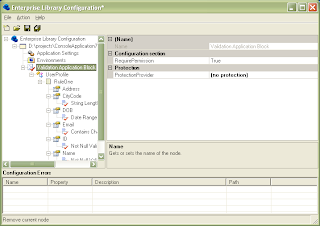
Step 3 (GUI):
Start the Enterprise Library Configuration tool by going to Start > Programs > Microsoft patterns and practices > Enterprise Library 4.1 - October 2008 > Enterprise Library Configuration.
You may have a different version of the Enterprise Library installed - I'm using 4.1, but you can use 3.1 just as well.
Using the Enterprise Library Configuration tool,
(i) add a Validation Application block section,
(ii) Add a type,
(iii) Add the properties (or fields/methods, as the case may be),
(iv) Add validators to the properties (or fields/methods from iii ), and
(v) Provide the parameters for the validators, if applicable
Step 3 (Manual Config):
Add the validation configuration section in the config file (App.config or web.config) by adding the following line into the configSections tag:
<section name="validation" type="Microsoft.Practices.EnterpriseLibrary.Validation.Configuration.ValidationSettings, Microsoft.Practices.EnterpriseLibrary.Validation, Version=4.1.0.0, Culture=neutral, PublicKeyToken=31bf3856ad364e35" />
You would need to change the Version and PublicKeyToken if you're using a different version of the Enterprise Library.
Create the validation section, reference the type to be validated (from Step 2), add a ruleset, define the properties for the type (only the ones you need validated), and create the validators within the type. The hierarchy is validation > type > ruleset > properties > property > validator.
<validation>
<type assemblyName="MyApplication1, Version=1.0.0.0, Culture=neutral, PublicKeyToken=null" name="MyApplication1.UserProfile">
<ruleset name="RuleOne">
<properties>
<property name="Name">
<validator name="Not Null Validator" messageTemplate="Name must be entered" type="Microsoft.Practices.EnterpriseLibrary.Validation.Validators.NotNullValidator, Microsoft.Practices.EnterpriseLibrary.Validation, Version=4.1.0.0, Culture=neutral, PublicKeyToken=31bf3856ad364e35" />
</property>
</properties>
</ruleset>
</type>
</validation>
Step 4: Add the .NET code
Add the following using statement to the top of your code file:
using Microsoft.Practices.EnterpriseLibrary.Validation;
Add the following code to perform the validation:
UserProfile usrProfile = new UserProfile();
Validator<UserProfile> validator = ValidationFactory.CreateValidator<UserProfile>("RuleOne");
ValidationResults results = validator.Validate(usrProfile);
StringBuilder strBuilder = new StringBuilder();
foreach (ValidationResult iterResult in results) {
strBuilder.Append(iterResult.Message + "\n");
}
Console.WriteLine(results.isValid.ToString());
Console.WriteLine(strBuilder.ToString());
Step 5: Run the application
You can add different kinds of validators or even write your own custom validator, but that's something for another blog post.
Let's start off with a Console application. (This could even be a Windows Forms application, a Windows service or a Web Application/Web Site.)
Step 1: Add references to Microsoft.Practices.EnterpriseLibrary.Common and Microsoft.Practices.EnterpriseLibrary.Validation
Step 2: Create a class that can store your data
namespace MyApplication1
{
public class UserProfile
{
public int ID { get; set; }
public string Name { get; set; }
public string Email { get; set; }
public DateTime DOB { get; set; }
public string Address { get; set; }
public string CityCode { get; set; }
}
}
Step 3 (GUI):
Start the Enterprise Library Configuration tool by going to Start > Programs > Microsoft patterns and practices > Enterprise Library 4.1 - October 2008 > Enterprise Library Configuration.
You may have a different version of the Enterprise Library installed - I'm using 4.1, but you can use 3.1 just as well.
Using the Enterprise Library Configuration tool,
(i) add a Validation Application block section,
(ii) Add a type,
(iii) Add the properties (or fields/methods, as the case may be),
(iv) Add validators to the properties (or fields/methods from iii ), and
(v) Provide the parameters for the validators, if applicable

Step 3 (Manual Config):
Add the validation configuration section in the config file (App.config or web.config) by adding the following line into the configSections tag:
<section name="validation" type="Microsoft.Practices.EnterpriseLibrary.Validation.Configuration.ValidationSettings, Microsoft.Practices.EnterpriseLibrary.Validation, Version=4.1.0.0, Culture=neutral, PublicKeyToken=31bf3856ad364e35" />
You would need to change the Version and PublicKeyToken if you're using a different version of the Enterprise Library.
Create the validation section, reference the type to be validated (from Step 2), add a ruleset, define the properties for the type (only the ones you need validated), and create the validators within the type. The hierarchy is validation > type > ruleset > properties > property > validator.
<validation>
<type assemblyName="MyApplication1, Version=1.0.0.0, Culture=neutral, PublicKeyToken=null" name="MyApplication1.UserProfile">
<ruleset name="RuleOne">
<properties>
<property name="Name">
<validator name="Not Null Validator" messageTemplate="Name must be entered" type="Microsoft.Practices.EnterpriseLibrary.Validation.Validators.NotNullValidator, Microsoft.Practices.EnterpriseLibrary.Validation, Version=4.1.0.0, Culture=neutral, PublicKeyToken=31bf3856ad364e35" />
</property>
</properties>
</ruleset>
</type>
</validation>
Step 4: Add the .NET code
Add the following using statement to the top of your code file:
using Microsoft.Practices.EnterpriseLibrary.Validation;
Add the following code to perform the validation:
UserProfile usrProfile = new UserProfile();
Validator<UserProfile> validator = ValidationFactory.CreateValidator<UserProfile>("RuleOne");
ValidationResults results = validator.Validate(usrProfile);
StringBuilder strBuilder = new StringBuilder();
foreach (ValidationResult iterResult in results) {
strBuilder.Append(iterResult.Message + "\n");
}
Console.WriteLine(results.isValid.ToString());
Console.WriteLine(strBuilder.ToString());
Step 5: Run the application
You can add different kinds of validators or even write your own custom validator, but that's something for another blog post.
Sunday, December 21, 2008
Web Reference vs Service Reference
A co-worker recently asked about the difference between "Add Web Reference" and "Add Service Reference" in Visual Studio when working with WCF/Web services.
The difference between the two is quite simple - with Add Web Reference, Visual Studio uses the wsdl.exe utility to generate the proxy classes (.NET 2.0 compatible) while Add Service Reference uses svcutil.exe (requires .NET 3.0 or higher). When using Add Service Reference, you would also get additional entries in web.config for the proxy.
I *might* have another post that goes into more detail over the differences.
The difference between the two is quite simple - with Add Web Reference, Visual Studio uses the wsdl.exe utility to generate the proxy classes (.NET 2.0 compatible) while Add Service Reference uses svcutil.exe (requires .NET 3.0 or higher). When using Add Service Reference, you would also get additional entries in web.config for the proxy.
I *might* have another post that goes into more detail over the differences.
Subscribe to:
Posts (Atom)